Error explained
"Moov atom not found": what it means and how to fix it
You try to open an MP4 and get moov atom not found — in a player, in FFmpeg, or in a script. It looks fatal, but in most cases your footage is still there. This explains exactly what the error means, why it happens, and how to repair the file on your own PC.
What the moov atom is
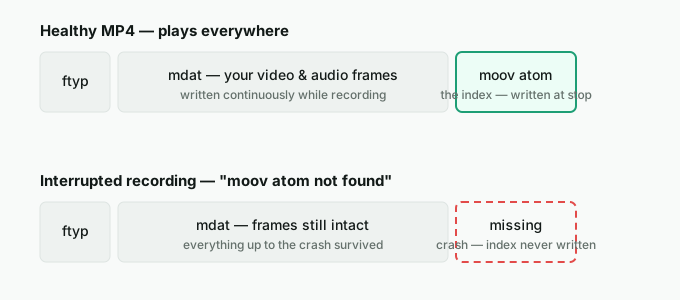
The moov atom is a small block of metadata inside every MP4/MOV file. It's the index a player reads first: it defines the timescale, the duration, and the exact location of every audio and video frame. Without it, a player has the raw data but no map to play it — so it reports moov atom not found.
Key point: "moov atom not found" almost never means your footage is gone. It means the index is missing. The frames are usually still sitting in the file, unreadable only because nothing points to them.
Why you're seeing this error
By design, an MP4's moov atom is written after recording finishes, when the file is finalized. If that final step never happens, the index is never created. Common causes:
- The recorder crashed mid-recording (OBS, a screen recorder, a camera app).
- Power loss or a forced shutdown before the file was closed.
- The disk filled up while recording, truncating the file.
- An interrupted transfer or download that cut off the end of the file.
Can it be fixed?
Usually, yes — if the file was interrupted rather than physically damaged. Because the frames are intact and only the index is missing, the moov atom can be rebuilt. The most reliable method uses a reference file: a short, healthy clip recorded with the same device and settings. Its correctly written moov atom becomes the template for reconstructing the missing one in your broken file.
How to fix "moov atom not found"
- Work on a copy. Never run repairs on your only file — duplicate it first.
- Try a stream copy first. A plain FFmpeg re-mux (
ffmpeg -i broken.mp4 -c copy fixed.mp4) occasionally rebuilds a readable file when only the very end was lost. It's quick and worth a first attempt. - Use a reference clip. If the stream copy fails, record ~10 seconds with the same app/settings and use it as a reference so the missing index can be rebuilt. This is what the open-source tool untrunc does — and what StreamSalvage does with a free preview and no command line.
- Confirm playback. Open the repaired file and check audio/video sync before trusting it.
Rebuild the missing moov atom — locally
StreamSalvage reconstructs the moov atom on your own PC using a short reference clip. Preview the fixed file for free, pay $29 only if it works, and your video is never uploaded.
Download StreamSalvage for WindowsHow to prevent it next time
Record in a format that stays readable if the app crashes: capture to MKV and remux to MP4 afterward, or enable fragmented MP4, which writes the index incrementally. Either way a crash leaves a file you can still open. See OBS MKV vs MP4 recording settings for the details.
Frequently asked questions
What does "moov atom not found" mean?
It means the MP4's moov atom — the index that tells a player where every frame is and how long the video runs — is missing. The video data is usually still in the file; without the index, no player can read it, so it throws the moov atom not found error.
Can a missing moov atom be fixed?
Often yes. If the file was only interrupted (a crash or power loss before finalizing), the frames are intact and a healthy reference file recorded with the same settings can be used to rebuild the missing moov atom and make the video playable again.
What causes the moov atom to go missing?
The moov atom is written when recording finishes. If the recorder crashes, the PC loses power, or the disk fills up before that final step, the index is never written even though most of the footage is on disk.
How do I fix moov atom not found without uploading my video?
Use a local tool. StreamSalvage rebuilds the missing moov atom entirely on your PC using a short reference clip, so your footage is never uploaded, and it previews the repaired file for free before you pay.